 WaveCheck
Wi‑Fi & Bluetooth meter for Mac
Your router, your phone, your kid's tablet, your earbuds: they all give off Wi‑Fi and Bluetooth radiation, day and night. WaveCheck measures it from your Mac in 30 seconds.
7 days free · then $14 $9 once · no account, no subscription
Also want the free bedroom checklist? · Read it here
5 easy changes to cut Wi‑Fi & Bluetooth radiation in your bedroom tonight. We'll email it to you now, with the WaveCheck link to measure yours on your Mac.
7 days free · then $9 once · macOS 14 or later
On your Mac right now?
No extra gadget. WaveCheck uses the Wi‑Fi and Bluetooth radios already inside your Mac.
Your total exposure right now, compared with the international safety limit.
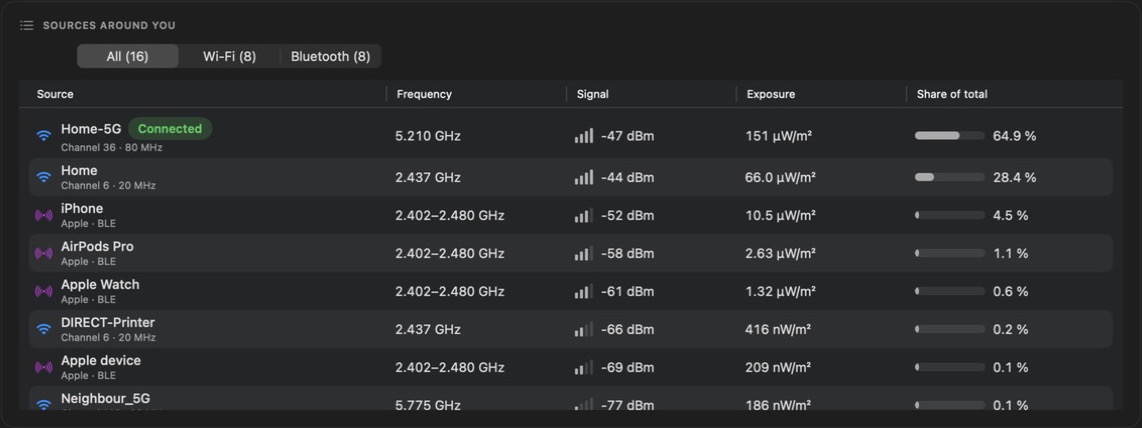
Every router, phone, laptop and pair of earbuds around you, ranked by how much each one adds.
Where the strongest signals are, and what moving a router actually does. Twice as far means 75% less.
WaveCheck is sold directly, not through the App Store, so macOS asks you to allow it once. It takes 30 seconds.
Open WaveCheck.dmg and drag WaveCheck into Applications.
Double-click WaveCheck. macOS says it can't verify it. Click Done.
Go to System Settings › Privacy & Security, scroll down, click Open Anyway.
Confirm with your Mac password. From now on it opens like any other app.
Not yet. iPhones don't let any app scan nearby Wi‑Fi networks, so a real measurement isn't possible there. Be careful with iPhone "EMF meter" apps: most read the compass sensor, which can't detect Wi‑Fi at all.
It's a careful estimate from your Mac's radio, good to about ±10 dB, so treat the result as an order of magnitude. Its assumptions lean high rather than low. It's great for comparing rooms and devices, but it isn't a lab instrument or a medical device.
Bluetooth lets it hear nearby devices. macOS only shows Wi‑Fi network names to apps with Location access. WaveCheck never reads or stores where you are.
Any Mac with macOS 14 Sonoma or later, Apple Silicon or Intel.
Yes, within 14 days, no questions asked: support@getwavecheck.com.
It takes 30 seconds to see what's really around you.
7 days free · then $9 once
7 days free · then $9 once